Showing posts with label blender. Show all posts

Friday, June 1, 2007

Bugs bugs bugs..

I caught some sickness, hence the late blog. I'm back on track now. This doesn't mean that nothing has been done though.

While trying to fix the trigger problem mentioned in the previous blog enty (causing the server to crash because it would reference actors removed from the system), I identified several other issues. Most of them were easily fixed, but one in particular was especially hard to get nailed. It had to do with the way that boost::python converts shard_ptr from python to c++. This is done (when passing by copy or const reference) by creating a new shared_ptr that points to the same pointer but has a custom deleter. This deleter keeps a reference to the python object in order for python to find the python object when passing the shared pointer back to python. The deleter will not delete the pointer itself, but just deref the shared_ptr kept in python. This means that we could not compare shared pointers that we got from python to c++ calls, because they were entirely new ones for each call! This took me quite a while to figure out.

I've also managed to get consistent naming for the scripting and c++ calls, and documented the global functions for scripts.

Projections on the floor works now, but unfortunately they drift a little. Need to figure that out.

Yesterday I drew a very simple animated man in blender. He has the animations: run, stand, beginrun. Now you can control him instead of the tank as requested by Simon. I still need some tweaking before it looks okey though, but it is a step in the right direction.

Simon has been working on creating a set of states for the finite state machine. Especially for the tortoise model. This means that it will patrol a little and attack any players within a given radius. Pretty nice I think. We've discussed how to make it easier to model the behaviour without scripting a lot of states. For now the way to go is to add paramters to the actors that the state can query. From these parameters the state machine can figure out how to behave e.g. aggression = 200 -> go attack.

Tuesday, February 20, 2007

Graphics

I've been ill for about a week now and not fully up to speed yet. This also means that I haven't been able to do much investigation about the AI.

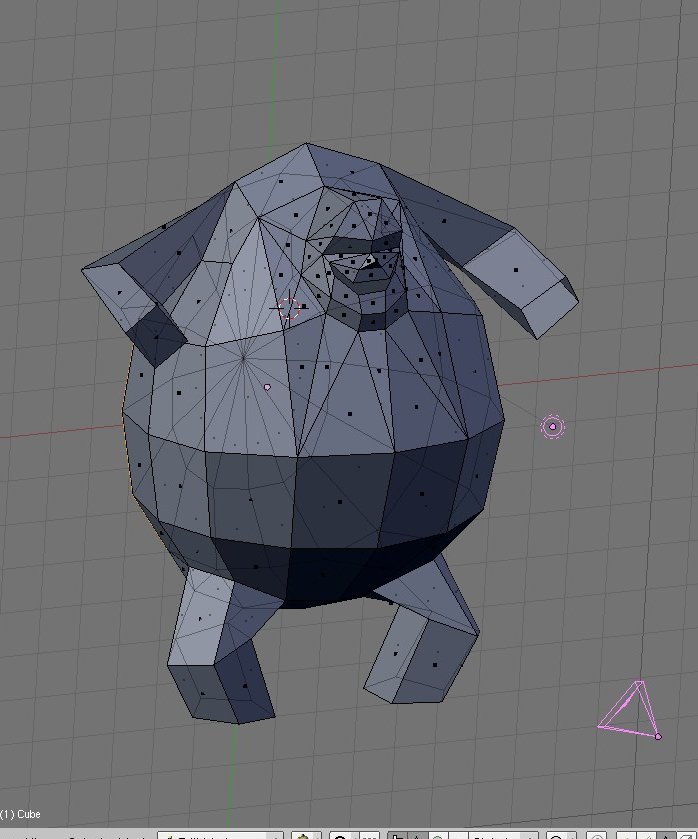
Yesterday Blender 2.43 was finally released, yay. That inspired me to try to convert an actor "Enemy Sack" created by our concept artist Daniel Laursen into a 3D version. The start of the low poly version is displayed below (click for full size). The high poly will probably make use of the new sculpt mode in blender 2.43 :)


Btw. wow = lvl 20 => cat form :D

Thursday, February 8, 2007

Blender v2.43rc1

Just downloaded the new blender v.2.43 rc , and this one comes with a bunch of really nice features. The most exciting one is bake to texture which will allow you to bake the normals or the rendered result into a uv-map. This means that you can fake a lot of nice texture effects in a game engine easily by first creating a very detailed model in blender and bake the texture. This texture is then simply used directly in the game engine. Of course, you will have to make a bumpmap etc. to get position dependent properties, but it is really a leap forward I think. There has been a bake script available in blender for previous releases, but the up coming build in bake functionality really rocks.


All this made me even more hooked on blender and I've been messing around with it a bit. I've been reading a lot of tutorials and downloaded many new texture images, but also learned a lot of new key shortcuts which is essential when using blender. This makes the learning curve quite steep, but also makes it a very powerful tool once you get acquainted with it. Kinda the emacs of 3D modellers :)

Because I'm obviously now in model creation mode I've decided to document the mode creation pipeline for the game. This should make it much easier for new comers to get involved without getting de-motivated by the steep learning curve and lack of documentation. At the same time I'll create a very tiny tool that can be used for viewing models created without starting the game server etc. Maybe it will simply be game client run with a special command line option.

Tuesday, February 6, 2007

Axis ready

Yesterday I tried out my new usb numpad (I have a laptop) for drawing an axis model in blender. It worked very well indeed. I'm loving blender and are getting more addicted the more I use it. I was modelling a simple xyz-axis, where x is red, y is green and z is blue. This is a standard gizmo in all modelling tools and I've really missed it while positioning actors in the game.

The next developing aids in the pipeline are:
  • Bounding box drawing
  • Cirkular area drawing (by projection).
  • Rectangular area drawing (by projection)
  • Drawing text next to an actor
  • Picking of actors in the gui, and displaying the BB
  • "Drawing" of cirkular/rectangular areas in order to create Area actors
This will also be initial steps towards the editor :)